 Reef Buddy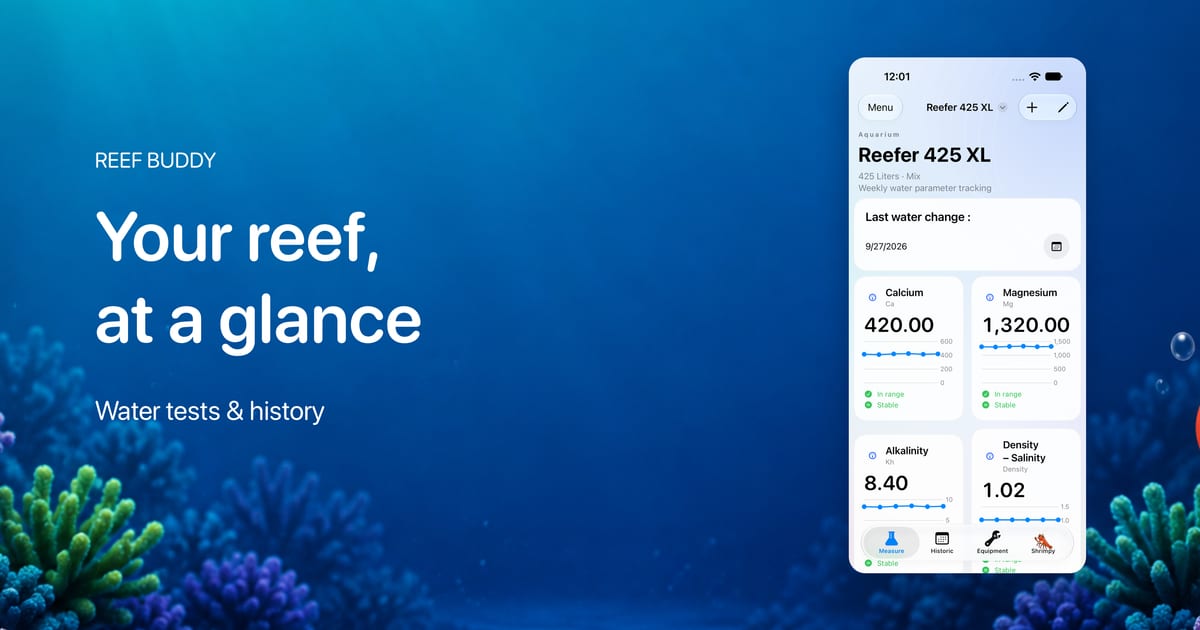
Reef Buddy 3.0.0 introduces a new design across the app. From your aquarium dashboard to parameter history, calculators, and Shrimpy, the screens you use to follow your reef now share a refreshed visual language.
The aim is simple: make the information you record easier to read and the actions you take easier to find. Whether you are adding a water test, looking back over a month of measurements, or checking which piece of equipment needs attention, the redesign puts those everyday tasks at the center.
Your reef, at a glance
The aquarium dashboard brings your measurements into rounded cards, with prominent values and small trend charts. Your aquarium name and details sit above the readings, alongside a dedicated card for your last water change.
Each parameter card brings together its name, latest recorded value, chart, and available range and stability indicators. That gives you more context before you open the full history of a measurement.
For example, when reviewing your alkalinity, you can see the latest reading alongside its recent direction. You can then open the parameter to explore the individual results behind that overview.
Light surfaces, blue accents, and a subtle aquatic background give the dashboard its new look while keeping the measurements visually prominent. The result is an overview built around the information you come back to most often.
A clearer view of your parameter history
Recording a test is only part of the routine. Looking back at previous readings is what makes that record useful.
In version 3.0.0, the parameter detail screen uses distinct cards to organize the chart, notes when present, and an explanation of the parameter. Your recorded measurements follow in the history section.
The chart area brings your configured target range and chart controls together. You can switch between line and bar views, then review the dated readings below when you want more detail.
The aquarium history view also adopts the refreshed parameter cards, giving past readings a presentation consistent with the dashboard. Your measurements and water-change history remain central to that review.
If you are building a regular review habit, our parameter dashboard guide offers ideas for organizing it.
The same design across calculators and Shrimpy
The redesign continues beyond the tracking screens.
The reef calculator now uses the same card layout to separate brand selection, the parameter you are working with, calculation inputs, and instructions. This gives each step a defined place as you work through a supported test.
Shrimpy also receives a refreshed home screen. Alongside the familiar shrimp character, a dedicated card groups the options to ask a question, start a conversation, or send a picture.
On the parameter detail screen, the Request Shrimpy analysis action sits at the bottom, so you can find it while reviewing a measurement. Shrimpy’s AI features require a Premium subscription.
These tools were already part of Reef Buddy. Version 3.0.0 brings them into the same visual system as the rest of the app, making the move between tracking, calculating, and asking for help feel more consistent.
Equipment maintenance that is easier to act on
Version 3.0.0 also improves the equipment maintenance workflow. Equipment that is due for maintenance is easier to spot, and you can mark a completed maintenance task directly from the equipment details screen.
After cleaning a pump or servicing another piece of equipment, you can record the work from its own details without returning to the list to find the completion action.
It is a small change with a practical purpose: make recording maintenance a natural last step of the job. For help planning that routine, see our daily, weekly, and monthly maintenance checklist.
Clearer messages when signing in
The update also includes clearer messages when you encounter a problem signing in to your account. Those moments deserve the same attention as the main screens: the message should help you understand the problem and what to try next.
Take a look around version 3.0.0
Start with your aquarium dashboard, open one of your regularly tracked parameters, and explore its history. Then visit your equipment details and the refreshed Shrimpy screen.
Those few stops show what this update is about: a more consistent design for the tasks that make up your reef-keeping routine, with your aquarium records at the center.
Visit the Reef Buddy App Store page to check the version available for your device. We would love to hear how the new design fits into your daily routine—share your feedback at contact@reef-buddy.app.