 Reef Buddy
A refugium is a protected part of an aquarium system where organisms such as macroalgae and copepods can grow away from the display’s fish. In a reef sump, it often sits between filtration equipment and the return pump.
Growing macroalgae takes up nutrients; removing some of that growth exports them from the system. A refugium can also provide habitat for small organisms. It does not guarantee an algae-free display or replace cycling, testing, and routine maintenance.
Decide what you want the refugium to do
Write down one primary goal before buying equipment: grow macroalgae for nutrient export, provide a protected habitat, or both. If nitrate and phosphate already read very low, adding more export may not address your tank’s actual problem.
For this guide, the example is a Chaetomorpha sump refugium. TUNZE describes Chaetomorpha cultivation and harvesting as a way to remove nitrate and phosphate. Other algae and dedicated reactors have different requirements; use their specific instructions rather than copying a sump layout.
Where the refugium fits in a sump
Bulk Reef Supply’s illustrated sump setup places the refugium after the skimmer area and before the return pump. Baffles separate the chambers and help keep material away from the pump. Water drains from the display to the sump; the return pump sends it back up.
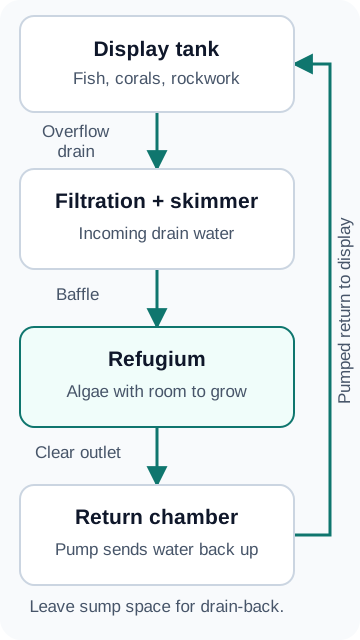
An all-in-one rear chamber or a hang-on refugium can serve a similar purpose, but available space, outlet protection, and mounting differ. Start with the sump setup guide if you are still choosing filtration. A larger sump adds water volume, but it does not increase the display’s swimming space; use the tank-size planning guide for that decision.
A worked planning example
Illustrative plan, not a tested Reef Buddy tank: imagine a 200 L display with a sump that has an available 30 × 25 cm chamber. At a 20 cm operating water depth, the chamber holds about 15 L before displacement: 30 × 25 × 20 ÷ 1,000.
That calculation describes the space available. It does not establish the refugium’s nutrient-removal capacity, and it is not a recommendation that every 200 L tank needs 15 L of refugium.
Use this planning worksheet:
- Access: can you lift algae out and clean the chamber without removing the light or plumbing each time?
- Containment: is there a cleanable barrier between loose algae and the pump intake?
- Lighting: does the chosen fixture cover this chamber at its specified mounting distance?
- Water level: where is the normal operating line, and how much empty sump capacity is needed when the pump stops?
- Observation: where will you take repeatable photos so you can compare growth?
Do a pump-off and restart check following the aquarium manufacturer’s instructions before adding algae. Confirm the sump holds the returning water and the system restarts normally. Never use spare flood capacity simply to make the refugium deeper.
Set up light, algae, and flow
Use a fixture intended for algae growth and mount it according to its instructions. Start with a modest portion of healthy Chaetomorpha, leaving room to inspect and harvest it. Keep the return path clear. The goal is circulation through the chamber without loose material collecting at the pump intake; a universal gallons-per-hour target cannot account for every chamber and outlet.
Chaetomorpha can grow free of an anchoring substrate. Sand or mud is a separate habitat choice, not an automatic requirement for this example. Choose it deliberately, including how you will maintain it.
Bulk Reef Supply describes running the refugium light while the display is dark to help moderate overnight pH decline. It is an option, not a guarantee of a particular pH. Record the light schedule and follow the fixture or algae supplier’s starting guidance rather than assuming continuous lighting is better.
Make the first month observable
The following is a suggested record-keeping routine, not a promised growth timeline:
- Before setup: record nitrate, phosphate, salinity, the test methods, and your normal feeding and filtration routine.
- At installation: photograph the starting algae portion and note the light setting and schedule.
- During routine checks: inspect the outlet, water level, algae condition, and whether debris is accumulating.
- At each weekly review: repeat the photos and nutrient tests consistently. Record any feeding, water-change, or filtration changes alongside them.
- When harvesting: record approximately how much you removed and retain healthy growth. Harvest based on crowding and growth, not a fixed calendar alone.
A falling nutrient result alongside visible growth is useful evidence, but it does not isolate the refugium’s effect if you also changed feeding or filtration. Change one adjustable setting at a time where practical, then compare the next observations.
Troubleshooting: check before adjusting
Little or no visible growth
Confirm that the light actually follows its timer, the algae remains in the illuminated area, and water reaches the chamber. Recheck the nutrient measurements and test procedure. Do not automatically increase feeding or add trace-element supplements solely because algae has stopped growing.
Algae becomes pale, breaks apart, or traps debris
Inspect the light exposure, water movement, and algae condition. Remove loose deteriorating material that could reach the pump, and record when the change began. If the cause remains unclear, discuss the setup and test results with the algae supplier before adding treatments.
The outlet starts clogging
Address the obstruction promptly. Recheck the normal water level and clean the containment barrier; reducing the portion of algae may restore clearance. Make outlet inspection part of harvesting, not a separate task you might forget.
Nitrate or phosphate falls below the range you were maintaining
Confirm the reading before making another change. Review the whole export routine, including media and water changes. Consider reducing refugium lighting duration rather than automatically adding more food. Follow the needs of the display livestock, not a goal of growing the largest possible algae mass.
What to log in Reef Buddy
Keep nutrient readings, light-schedule changes, harvest notes, and photos together. For example: “Shortened light schedule; no feeding change; outlet cleaned.” This gives the next measurement context without claiming that one adjustment caused every change.
Continue with the reef testing schedule to plan consistent measurements, and the ATO setup guide if changing sump chambers affects your top-off arrangement.